
cz. 4 Aplikacja mobilna – dawniej gadżet, dziś konieczność?
Początkowo aplikacje bankowe były traktowane zarówno przez Klientów, jak i przez same banki, jako nowinka technologiczna, dzięki czemu pierwsze Banki udostępniające taką możliwość uchodziły za innowacyjne (mimo, że udostępniały tylko kilka podstawowych funkcji).
Cóż, czasy się zmieniły… Aplikacje bankowe przestały być tylko i wyłącznie atrakcyjną zabawką, a zaczęły służyć Klientom jako podstawowe narzędzie pracy. W pewien sposób Banki nie mogą już ich uniknąć.
Dzieje się tak z dwóch powodów. Po pierwsze duża część Klientów dysponuje już smartphonem i chce z niego korzystać przy nawet najbardziej prowizorycznych czynnościach. Po drugie technologia poszła do przodu, dzięki czemu mamy do czynienia ze wzrostem możliwości technicznych telefonów komórkowych. Zdając sobie z tego sprawę, Banki postanowiły rozwijać funkcjonalność transakcyjną swoich aplikacji mobilnych, co jak pokazują dane, przekłada się na coraz częstsze korzystanie z tego rozwiązania przez Klientów. Skoro jest potrzeba i są możliwości, znajdują się i użytkownicy.
Jakie funkcje udostępniają nam Banki w telefonie? Przekonajmy się.
Codzienna kontrola finansów
Duża część użytkowników bankowych aplikacji mobilnych ceni sobie możliwość kontroli swoich finansów bez względu na miejsce i czas. W związku z tym wszystkie dostępne na rynku bankowe aplikacje mobilne udostępniają Klientom taką możliwość: użytkownicy mogą bez ograniczeń sprawdzać saldo i historię rachunku.
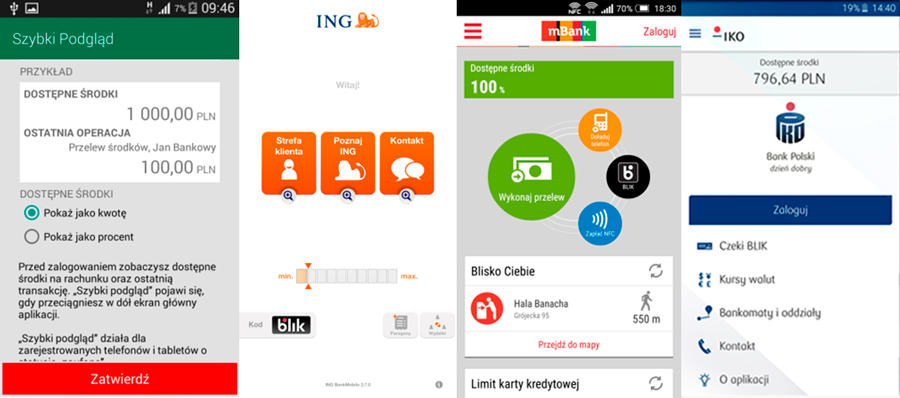
Sprawdzanie stanu salda należy do najpopularniejszych czynności dokonywanych za pomocą aplikacji mobilnej, w związku z tym większość aplikacji udostępnia taką możliwość bez konieczności logowania. Do niedawna z tej funkcji korzystali tylko Klienci mBanku i ING Banku Śląskiego, obecnie wskaźnik salda widoczny z perspektywy niezalogowanego użytkownika lub widget na pulpicie wyświetlający stan konta powoli staje się standardem na rynku, gdyż taką możliwość udostępniają już także Banki BZ WBK, Millennium oraz PKO BP. Mimo wygody tego rozwiązania, budzi ono wątpliwości, że ktoś niepowołany odczyta taką informację. Obawy są może i zasadne, ale Banki proponują rozwiązania, dzięki którym ryzyko jest minimalizowane. Po pierwsze wszystkie aplikacje umożliwiające taką funkcję przewidują jej wyłączenie, a po drugie oferują opcje, dzięki którym stan konta będzie odczytywalny jedynie przez jego właściciela. Aplikacje mBanku, BZ WBK, PKO BP oraz Millennium przewidują funkcje wyświetlania stanu konta w wartościach procentowych, przy czym użytkownik aplikacji samodzielnie definiuje wartość dla 100%, dzięki czemu tylko on wie, jaka kwota kryje się pod 40%. Na wyróżnienie zasługuje też aplikacja ING, gdzie stan konta przed logowaniem wyświetlany jest w formie wyświetlacza, którego granice wyznaczają wartości minimalną i maksymalną (ustanawiane samodzielnie). Im więcej kafelków jest pomarańczowych, tym więcej pieniędzy użytkownik ma na koncie. Stan konta w ING można odczytać także, instalując na pulpicie specjalny widget.
Aplikacja BZ WBK wprowadziła jeszcze jedno zabezpieczenie, a mianowicie stan konta i informacja o ostatniej dokonanej operacji wyświetlają się dopiero po przeciągnięciu w dół ekranu aplikacji.
Przelewy i płatności
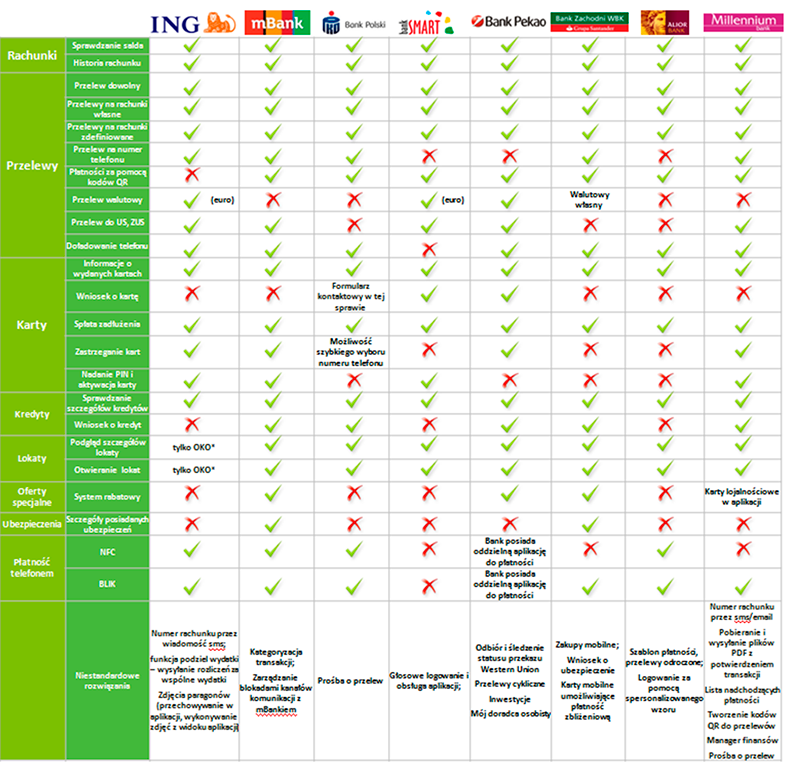
Kolejną popularną kategorią funkcjonalności są przelewy oraz różnego rodzaju płatności bezgotówkowe. Wszystkie Banki umożliwiają swoim Klientom dokonanie przelewu poprzez aplikację mobilną, co więcej – duża część z nich proponuje pewne rozwiązania, dzięki którym w łatwy i szybki sposób można doładować telefon czy dokonać przelewu do urzędu skarbowego czy ZUSu. Szybkie przelewy do ZUS czy US to bardzo praktyczna funkcja, ale póki co nie skorzystają z niej jeszcze klienci aplikacji PKO BP, BZ WBK czy Alior Banku. Aplikacje mobilne są też rozwiązaniem dla wszystkich tych, którzy mają problemy z zapamiętywaniem długich numerów rachunków – wszystko dzięki takim funkcjom jak przelew na telefon (taką możliwość oferują ING, mBank, PKO BP, BZ WBK oraz Millennium) czy płatności za pomocą kodów QR, będące już niemal standardem na rynku aplikacji. Na wyróżnienie zasługuje tu jednak aplikacja Banku Millennium, która umożliwia samodzielne tworzenie kodów QR.
Oszczędzanie i pomnażanie oszczędności bez wychodzenia z domu
Aplikacje stają się również coraz częściej narzędziem, dzięki któremu można skorzystać z produktów dodatkowych. Za pośrednictwem telefonu możemy już założyć lokatę (takiej funkcji nie udostępnia jedynie Bank ING), złożyć wniosek o kredyt osobisty (nie zrobią tego jedynie klienci ING, Alior oraz SMART BANKU) czy dokonać spłaty zadłużenia na karcie kredytowej. Bank Pekao SA udostępnia ponadto formularze kontaktowe przeznaczone do kontaktu w sprawie produktów inwestycyjnych oraz kontaktu z biurem maklerskim. W aplikacji udostępnia nawet takie funkcje jak kalkulator lokat czy pożyczek, dzięki czemu klient może samodzielnie dokonać symulacji oferty przeznaczonej specjalnie dla niego.
Część aplikacji umożliwia też Klientom wydanie takich dyspozycji jak aktywacja karty czy zmiana numeru PIN, czego przez długi czas można było dokonać wyłącznie za pomocą infolinii. Takie czynności umożliwiają Banki ING, mBank, Bank SMART oraz Millennium. Aplikacja jest też praktycznym narzędziem w zastrzeganiu karty, z tej funkcji skorzystać mogą Klienci ING, mBank, Pekao SA, Millennium, a Klienci PKO BP mają możliwość szybkiego wyboru numeru telefonu w tej sprawie za pośrednictwem aplikacji.
Codzienne zakupy
Aplikacje mobilne oferują również możliwości, dzięki którym w niedługim czasie mogą wyprzeć karty płatnicze (przynajmniej w pewnym zakresie). Dzięki technologiom BLIK czy NFC, użytkownik aplikacji może dokonać płatności w sklepie. Takiej możliwości nie udostępnia swoim Klientom jedynie Bank SMART, natomiast Pekao SA posiada oddzielną aplikację mobilną służącą do takich płatności.
Wyróżniki na rynku aplikacji
Poszczególne aplikacje udostępniają też funkcje charakterystyczne dla danego Banku. Na wyróżnienie na pewno zasługuje nowa funkcja aplikacji mBanku czyli „mLinia na klik”, a więc możliwość połączenia z konsultantem jako klient zweryfikowany, dzięki czemu pomija się etap nielubianej przez Klientów weryfikacji na infolinii. Nowością aplikacji ING jest natomiast link do serwisu transakcyjnego online bez konieczności dodatkowego logowania. Lubianymi funkcjami przez użytkowników aplikacji ING są też powiadomienia PUSH, informujące o operacjach na rachunku oraz funkcja „podziel wydatki”, dzięki której w pamięci aplikacji możemy przechowywać paragony za wspólne zakupy i rozliczać je w wygodny sposób. Plusem aplikacji SMART Banku jest przede wszystkim logowanie głosowe, a aplikacji Alior Banku logowanie za pomocą spersonalizowanego wzoru. Swój pomysł na logowanie ma także Bank Millennium, gdzie użytkownik może logować się za pomocą odcisku palca. Walorem aplikacji Millennium jest także samouczek, dzięki któremu użytkownik uzyska pomoc w korzystaniu z aplikacji. Co więcej, aplikacja umożliwia personalizację aplikacji poprzez m.in. zmianę jej tła. Na duże wyróżnienie zasługuje także Bank Pekao SA, gdyż duży nacisk kładzie na oferowanie nowych produktów, takie funkcje jak przegląd specjalnie przygotowanych ofert, przegląd innych aplikacji Banku, kalkulatory lokat i pożyczek, możliwość zapoznania się z produktami, a także dedykowane formularze kontaktowe w sprawie inwestycji. Pekao SA umożliwia także ustanawianie ulubionych funkcjonalności czy wybór formy wyświetlania menu (w formie listy lub koła). Warto też wspomnieć o aplikacji BZ WBK, dzięki której możemy dokonać zakupów mobilnych (np. zakup biletu), jednak przede wszystkim wyróżnikiem tej aplikacji jest funkcja doradcy on-line, z którym skontaktować się możemy w formie audio, wideo bądź tradycyjnego chatu.
Poniżej prezentujemy porównanie najważniejszych funkcjonalności wszystkich ujętych w badaniu Banków. Uprzedzamy, że jest to tylko część funkcji, jakie umożliwiają aplikacje mobilne.
Jeżeli jesteście Państwo zainteresowani szczegółową analizą rynku aplikacji mobilnych (zarówno w odniesieniu do sektora finansowego, jak i innych branż), to zapraszamy do współpracy.